 QR scan
TAP
Instant and effortless
Customers hold a compatible phone near the product to open your selected page.
No camera needed
Help customers reach your Google review page with one NFC tap or QR scan from a polished countertop stand.
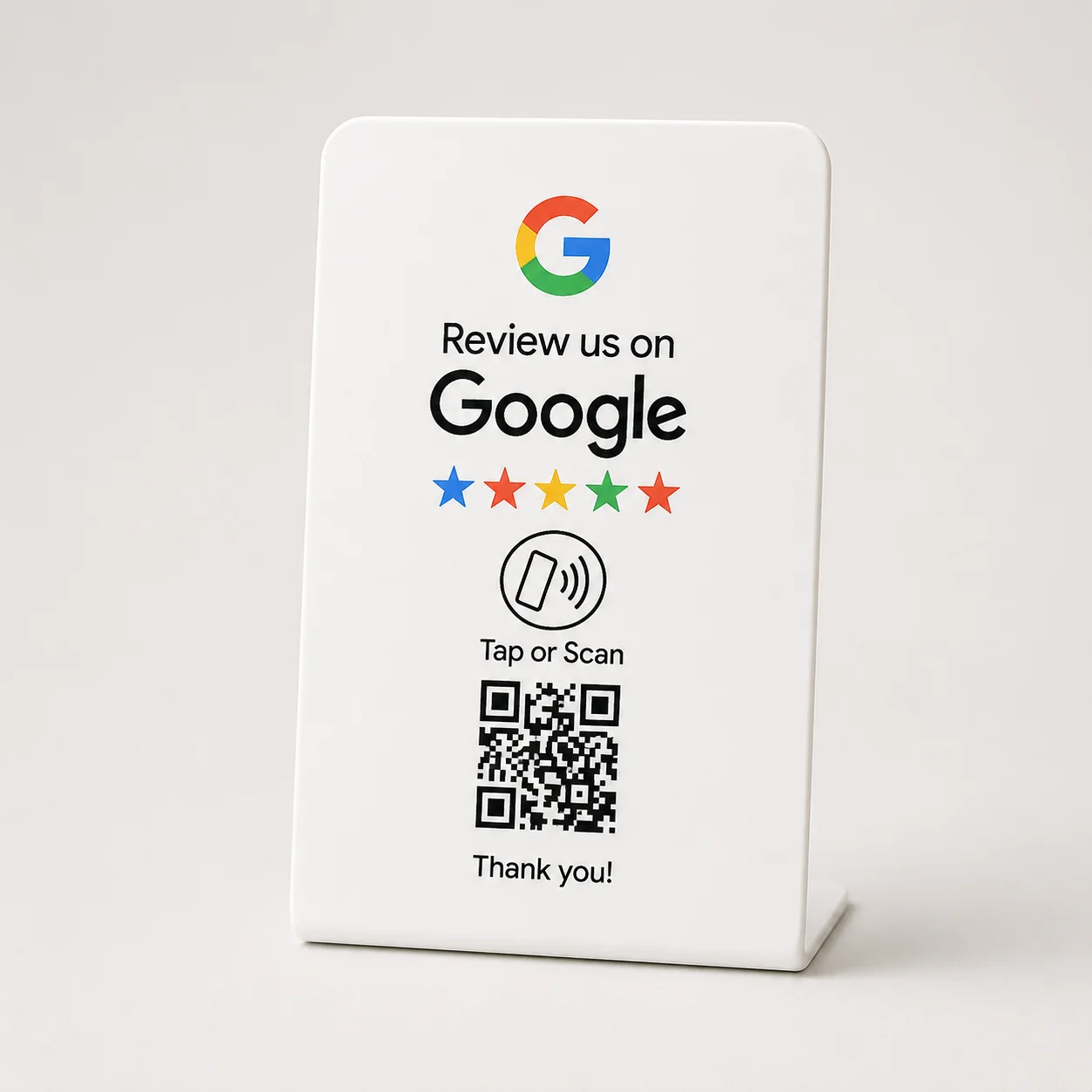
The NFCPlate Google Review Stand combines an NFC tap point and printed QR code in one countertop product. Connect it to your business's direct Google review page, test both paths, and place it at checkout, reception, or another natural end to the customer experience.
One standard NFCPlate stand with NFC and a printed QR code
Copy your review link from your Google Business Profile, assign it during product setup, and test both the NFC tap and printed QR code. Place the stand where customers finish their visit.
Keep the NFC prompt and QR code visible and free of dirt or glare. Designed for modern iPhone and Android phones.
Both actions open the same destination you selected for your business. Customers simply choose whichever feels more natural.
Customers hold a compatible phone near the product to open your selected page.
Customers point their phone camera at the QR code and open the same destination instantly.
Both paths open the same intended business destination. Customers choose whichever feels natural—without downloading a separate app.
Checkout counter or reception desk
Customers choose NFC or the clearly visible QR code.
The intended business destination opens directly.
Place google review stand where this interaction naturally finishes.
Place google review stand where this interaction naturally finishes.
Place google review stand where this interaction naturally finishes.
Place google review stand where this interaction naturally finishes.
| Product | Format | Placement | Portable | NFC | QR | Best use |
|---|---|---|---|---|---|---|
| Google Review StandCurrent | NFC + QR Counter Stand | Checkout counter or reception desk | Stationary | Included | Included | Inviting customer feedback at checkout or reception |
| Instagram Follow Stand | NFC + QR Counter Stand | Checkout counter or reception desk | Stationary | Included | Included | High-visibility customer handoffs |
| Google Review Keychain | Double-Sided NFC Keychain | Keys, lanyard or mobile service kit | Yes | Included | Included | Portable customer handoffs |
| Facebook Follow Keychain | Double-Sided NFC Keychain | Keys, lanyard or mobile service kit | Yes | Included | Included | Portable customer handoffs |
Confirmed product details for the standard design shown on this page.
It is a countertop sign with an NFC tap point and a printed QR code. After setup, either action opens your business's Google review page so customers can choose to leave feedback.
Open the Google Business Profile you manage, select Read reviews, then Get more reviews, and copy the review link. Use that link when setting up your stand and test it on a customer phone before putting the stand on display.
NFC lets a customer open the review page by holding a compatible phone near the stand. A QR code opens the page through the phone camera. This stand includes both options, pointing to the same destination.
No separate NFCPlate app is needed to open the link. Customers must be signed into a Google Account to post a Google review. A Gmail address is not required to create a Google Account.
Choose a visible checkout counter, reception desk, or restaurant payment area where a visit naturally ends. Keep the tap point and QR code accessible, and invite feedback without interrupting service.
Customers can tap with a compatible NFC-enabled iPhone or Android phone. The printed QR code provides another option using a phone camera. Test both methods during setup.
No. The stand makes your review page easier to reach; customers decide whether to review and what to write. Ask for honest feedback without offering rewards, filtering out unhappy customers, or steering the rating.
Choose a stand for a fixed checkout counter or reception desk. A Google Review Keychain is portable and can suit mobile service teams or customer handoffs away from a counter.
The available options are the standard designs shown on this product page. Business-name and logo customization is not currently offered.
Use a clearly labeled destination, test both NFC and QR, and invite genuine feedback without steering the rating.
Use a stand at a permanent counter or reception area. Use a keychain when staff meet customers in different places.
Explore practical examples for restaurants, salons, dentists, gyms, retail stores, real estate, hotels, and service teams.